High Poly vs Low Poly — Understanding the Difference
Every game asset you've ever seen in a shipped title is low poly. But the best-looking ones were built starting from a high poly model. Understanding why game artists use both — and how they work together — is one of the most important concepts in 3D game art production.
What is a High Poly Model?
A high poly model is a 3D mesh with a very large number of polygons — potentially millions. All that geometry allows the model to capture incredibly fine surface detail: rounded edges, subtle surface curvature, engraved text, stitching, rivets, scratches, and any other physical detail you want on your asset.
High poly models are typically created in one of two ways. They're either sculpted in software like ZBrush or Blender's sculpt mode, where an artist pushes and pulls virtual clay at extremely high resolution. Or they're modeled as hard-surface assets in CAD-like workflows where every edge is carefully chamfered and beveled to produce smooth, realistic geometry.
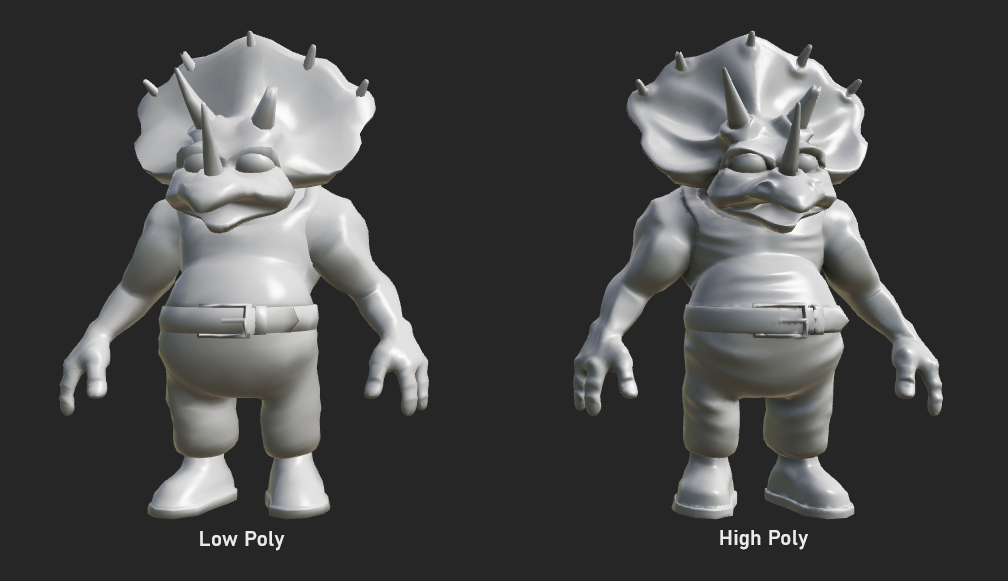
The key thing to understand about high poly models is that they never go into the game engine directly. They exist solely as a source of detail — a reference that the baking pipeline uses to generate texture maps for the game-ready low poly version.
What is a Low Poly Model?
A low poly model is a mesh optimized for real-time rendering — meaning it uses as few polygons as possible while still retaining the basic shape of the asset. This is the mesh that actually goes into your game engine and gets rendered at runtime.
Low poly counts vary enormously by game type and platform. A main character in a console game might use 15,000–80,000 triangles. A background prop might use 200–2,000. A mobile game character might use under 3,000. The goal is always the same: use the minimum number of polygons needed to convincingly represent the shape, then use textures to handle the rest of the visual detail.
Low poly models are built with efficiency in mind. Edges are placed only where silhouette changes are visible or where the mesh needs to deform during animation. Flat areas use as few polygons as possible. Rounded areas use just enough polygons to look smooth without wasting geometry budget.
Side by Side Comparison
Here's a clear breakdown of how the two mesh types differ across the properties that matter most in game production:
| Property | High Poly | Low Poly |
|---|---|---|
| Polygon count | Hundreds of thousands to millions | Hundreds to tens of thousands |
| Purpose | Source of detail for baking | Real-time game asset |
| Goes in the engine? | No — never used at runtime | Yes — this is what the player sees |
| Surface detail | Built into the geometry itself | Stored in texture maps (normal, AO, etc.) |
| Created in | Sculpting tools (ZBrush, Blender sculpt) or high-detail CAD-style modeling | Standard polygon modeling in Blender, Maya, 3ds Max, etc. |
| UV mapping | Not required (or minimal) | Required — clean UVs are essential |
| Render cost | Very high — offline renders only | Low — optimized for real time |
The High-to-Low Baking Workflow
The whole point of building both a high poly and a low poly version of the same asset is to use a technique called baking — transferring the detail from the high poly mesh onto textures that the low poly mesh will use. This is the industry-standard pipeline for game assets.
Build the high poly
Sculpt or model a highly detailed version of your asset. Don't worry about polygon count — focus entirely on getting the surface detail right. Add every bolt, crease, scratch, and chamfer you want.
Retopologize to create the low poly
Build a new, clean, optimized mesh that matches the general shape of the high poly. This is called retopology. The low poly should capture the silhouette of the high poly but use only the polygons it needs.
UV unwrap the low poly
The low poly mesh needs clean UV maps because the baked textures will be applied to it. The high poly doesn't need UVs for the baking step.
Bake from high to low
In your baking tool, align the high poly and low poly meshes and run the bake. The baker projects detail from the high poly surface onto the UV space of the low poly, generating normal maps, AO, curvature, and other maps.
Texture the low poly using the baked maps
Use the baked maps as a base for your texturing. The normal map restores the appearance of the high poly detail. AO adds depth. Paint your colors and surface wear on top.
Export the low poly + textures to your engine
The high poly stays in your asset folder as a reference. Only the low poly mesh and its texture maps go into the game engine. The player sees the low poly — but it looks like the high poly.
Polygon Budgets by Asset Type
There's no universal polygon count that's "correct" — it depends entirely on the platform, game type, and how prominent the asset is in the scene. These are rough industry guidelines, not hard rules:
| Asset Type | Mobile | Indie / Mid-tier PC | AAA Console / PC |
|---|---|---|---|
| Main character | 1,500 – 5,000 | 8,000 – 25,000 | 50,000 – 150,000+ |
| NPC / secondary character | 800 – 2,000 | 3,000 – 10,000 | 10,000 – 50,000 |
| Weapon / held item | 300 – 1,500 | 1,000 – 5,000 | 5,000 – 20,000 |
| Large environment prop | 200 – 1,000 | 500 – 3,000 | 2,000 – 15,000 |
| Small prop / pickup | 50 – 300 | 100 – 800 | 500 – 3,000 |
Using High and Low Poly in Trumble
Trumble supports the full high-to-low workflow. In the Bake tool, you can import both your high poly and low poly meshes, align them, and bake normal maps, AO, curvature, and other maps from the high poly geometry directly onto the low poly's UV space.
After baking, the Texture tool lets you paint and layer materials on your low poly mesh using the baked maps as a foundation. The normal map from your high poly bake will restore the appearance of all that sculpted detail. Paint your albedo colors, roughness variation, and edge wear on top to bring the asset to life.
Import high + low poly meshes. Bake normal, AO, curvature, and thickness maps from high to low in the browser.
Paint directly on your low poly using baked maps as reference layers. Full PBR channel support.
Export your low poly textures in formats ready for Unity, Unreal, Godot, or Roblox.